Alisa
Works
About
Note: All names, data and other details have been sanitised. Some product image have been redesigned with AI.
Insights Hubs: a 0→1 enterprise analytics ecosystem at AmexGBT
Project Overview
An internal BI platform for business analysts to explore and report on travel data, a parallel admin module for managing client access, user permissions, and package configuration, and a reusable Chart Design Kit built alongside.
My Role
Product Designer
Year: 2022-2025
01 Problem
The Core Problem
Business analysts needed a single, reliable place to access and explore data and the teams configuring that access needed a structured admin layer to make it happen cleanly.
Slow, manual reporting
Generating a standard report could take hours. Analysts spent more time preparing data than interpreting it; rebuilding the same views from scratch each cycle.
No single source of truth
Data lived across disconnected tools, spreadsheets, and email threads. Cross-referencing meant switching systems and reconciling discrepancies by hand.
No admin tooling
The teams responsible for configuring the platform setting up clients, managing users, controlling features - had no dedicated interface to do any of it reliably.
Unstructured access management
Client onboarding and user access control happened with no consistent process; leading to errors, delays, and permissions that didn't reflect actual business needs.
02 User Types
Different Mental Models
One of the most important early decisions was recognising that the reporting tool and the access management module served fundamentally different users with different goals, vocabularies, and success criteria. Designing for both, simultaneously, required keeping those models clearly separated.
The Analysts
Internal data analyst at AmexGBT, tracking performance across travel categories and surfacing insights for clients and stakeholders.
Needs to find answers fast, not build reports from scratch
Interrogates data, follows anomalies, drills down, cross-references
Works across Air, Hotel, Car Rental, Rail and other spend categories
Needs to share dashboards and collaborate with colleagues
Values speed, clarity, and the ability to drill from summary to detail
The Platform Admins
Internal account manager or ops admin responsible for setting up client access, configuring packages, and managing what users can see on the platform.
Onboards new clients: assigns IDs, reporting access, customizations
Manages user roles and access levels across the platform
Configures package branding (colours, fonts, loaders) per client
Controls which features are enabled for which clients
Needs accuracy above all; mistakes here affect what clients can access
Data visualization components
Line charts, bar charts, donut charts with standardized sizing, colour tokens, grid compatibility and axis labelling to ensure consistency across all dashboard views.
Alert system levels & button hierarchy
Neutral, Info, Success, Warning, and Error alert and button variants, each with consistent icon, background colour, border, and dismiss behavior. Used across both the BI reporting tool and access module flows.
Miscellaneous components & states
Custom components for steppers, sidebars, dual panel selectors, accordions ensured quick designing for several screens access management module screens.
Table & Grid views
Overview tables for dashlets, policies, user and client management and grid sizes for dashboard and collections to ensure quick prototyping and presentation.
04 Access Management Module
05 Design Toolkit
03 BI Reporting tool
The Approach
The KPI dashboard was designed around one core insight that reporting is not a passive activity. Analysts arrive at a dashboard with a question, spot an anomaly, and immediately need to go deeper. The platform had to support that natural movement from summary to detail, from metric to explanation without losing context or forcing a restart.


Key Design Decisions
Task-first home screen
The home screen presents three core actions alongside utility entries, keeping first-time users oriented while giving power users a fast path.
3-tier content model
Dashboards are individual KPI views. Collections group dashboards into themes. Packages bundle Collections into client-ready deliverables with branded styling.
Grid flexibility
Each widget is independently configurable, so analysts switch chart types, rename dashlets, and reposition widgets without rebuilding the whole view.
Multi-dimensional filter system with partial applicability
Not all filters apply globally. A warning system was designed to that surfaces partial applicability in context, with an Applied Filters panel summarizing exact scope in plain language.
Edit / Preview / Publish modes
Three distinct modes to support the development process. An editing state, a preview state, and a published view with a Share modal that shows collaborators and their permission levels.
Viz Collection: a governed library of charts
Dashlets are populated from a curated Viz Collection: a categorized library with a preview panel showing the chart, data source, recommended grid size etc. before adding.
The Approach
The access module runs in parallel to the reporting tool. It's the operational backbone that platform administrators use to onboard clients, manage user access, configure branding, and control which features are available to whom. Without this module working well, no analyst can access anything.


Line Over Stacked Bar Chart
01-Jan-2023 to 01-Jan-2024
100%
80%
0
Jan
Feb
Mar
Apr
May
Jun
Jul
Aug
Sep
Oct
Nov
Dec


Key Design Decisions
Dual-panel selector pattern
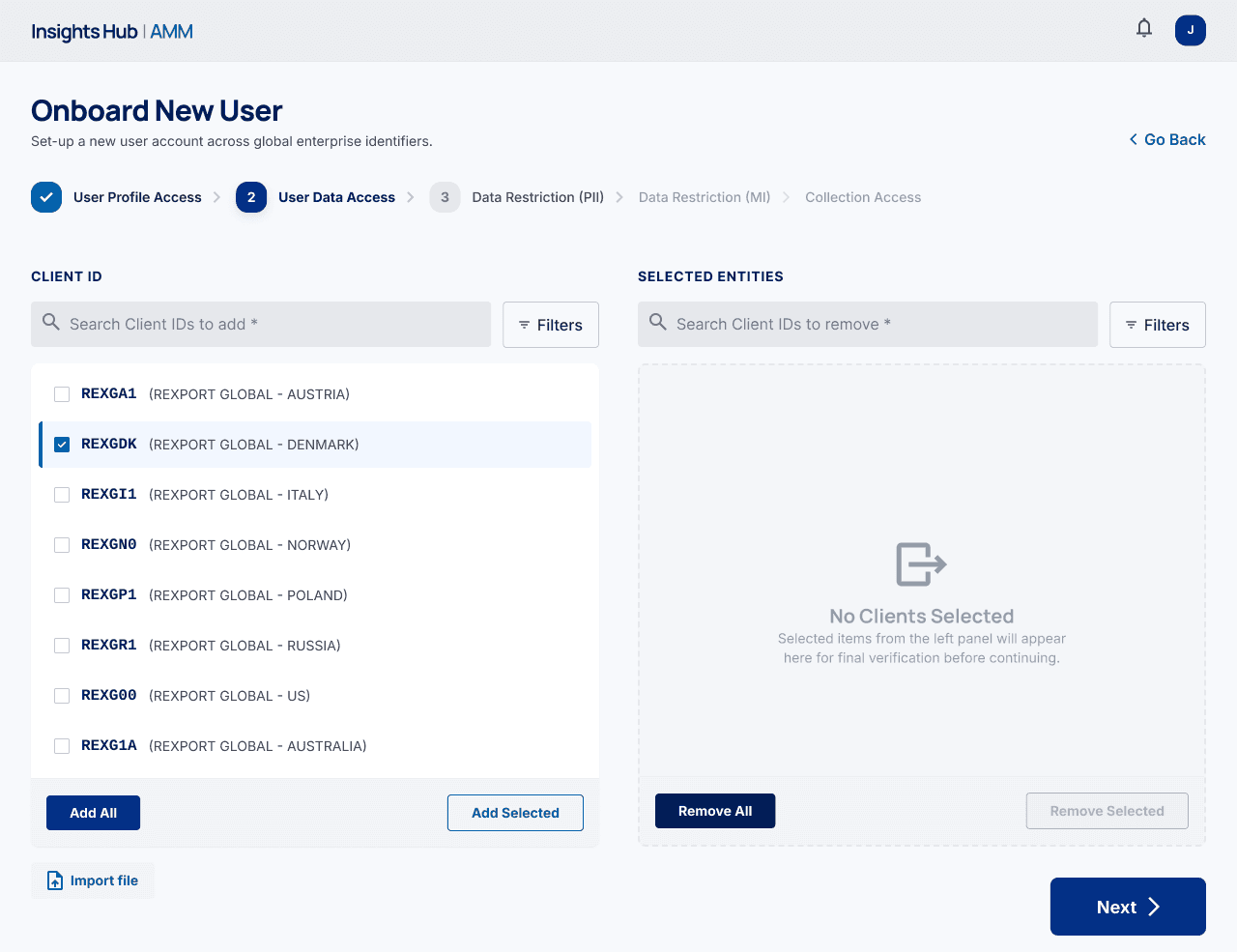
For client ID assignment, a split-panel layout keeps available and selected states simultaneously visible. This eliminates the constant switching between states that made the previous spreadsheet-based process error-prone and slow.
Template download + upload for bulk data
I designed a template-based upload pattern, admins download a pre-formatted CSV template, fill it, and upload it back, rather than manually entering each row in a form.
Flexible client onboarding process
The most complex flow is onboarding a new client, a multi-step process. I designed this with clear progress tracking and the ability to go back at any stage without losing work.
Customization with global styles
The Global Styles section lets admins or product owners with access customize their package, including logo, font family, colour palettes, loading animation style with preview and save options.
Previous
Next